Why Generic AI Image Tools Fall Short for E-commerce Product Photography
General AI tools can generate impressive images. They are not built for product photography. Here is what changes when the tool is designed for e-commerce instead of for everything.
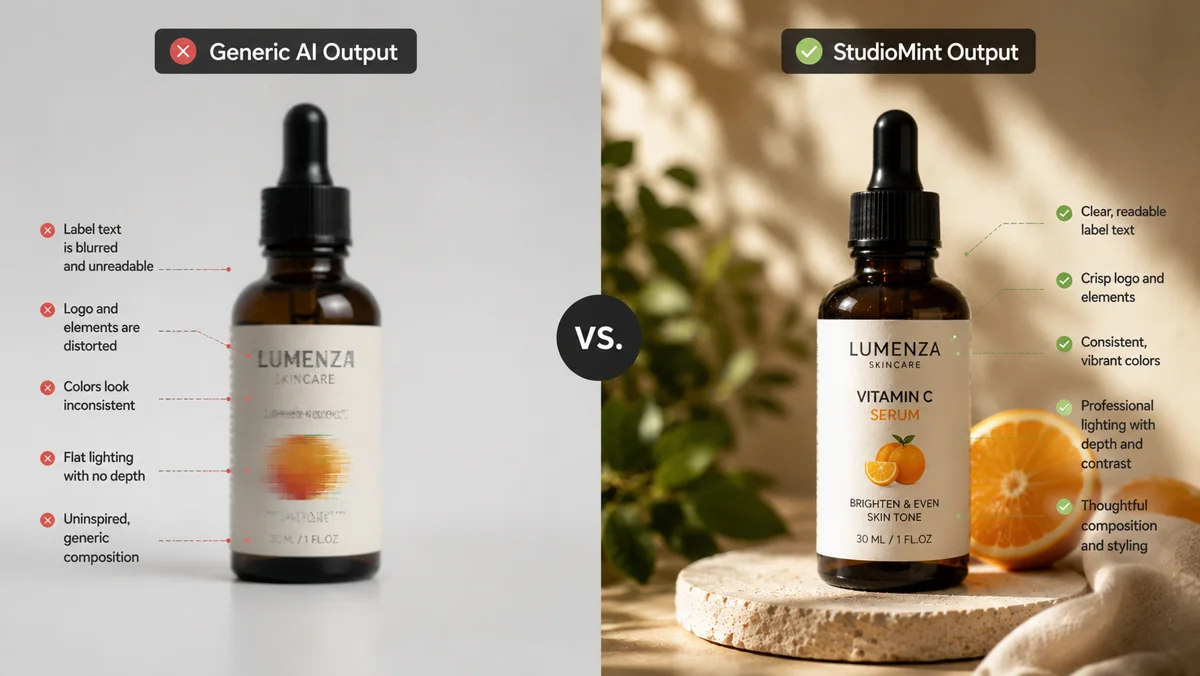
Most ecommerce founders try a general AI image tool first. It makes sense. The big-name models can generate almost anything, the marketing is everywhere, and the first few images often look stunning. So they upload a product, type a prompt, and wait to be impressed.
Then the actual work begins. The product gets reshaped. The label text turns into garbled letters. The lighting fights the brand. The composition is generic. After ten generations and three hours of prompt iteration, the best output is still half a step below what a basic product page needs. The tool that can draw anything turns out to be average at the one thing the business actually needs.
This is not a model problem. It is a product problem. General AI tools are optimised to do many things passably. Product photography is a narrow craft with strict commercial standards, and it rewards a tool that is built only for it.
What general AI tools are actually good at
Before getting into where they break for ecommerce, it is worth being honest about what general AI image tools do well. They are remarkable at open-ended creative work: concept art, illustrations, mood boards, fantasy scenes, stylised marketing visuals where the brief is loose and the output just needs to look good.
If the task is to imagine something new, they shine. If the task is to faithfully reproduce a real product with intact packaging, brand-consistent presentation, and commercial polish across dozens of variants, the same tools start fighting you.
Rule of thumb: general AI tools are good at invention. Product photography is the opposite problem. The product already exists, the brand identity is fixed, and the job is to wrap an accurate product in a commercial scene without changing the product itself.
Where general AI tools quietly fail for product photography
The failures are subtle until you try to use the output on a real product page. Then they become very obvious very fast.
Product fidelity drifts
The shape changes. A bottle gets taller or narrower. A jar lid loses its texture. A label text becomes nonsense. Buyers can spot this in under a second, and the moment they do, the listing loses trust. General models do not know that the product is the one thing in the image that must not be reinvented.
Composition defaults to centred and generic
Without explicit composition direction in the prompt, output skews toward symmetric, centred, eye-level shots. Those are the visual baseline of every competitor and the fastest way to make a brand look like a clone of every other store.
Lighting goes flat or wrong
Generic prompts produce flat ambient light, which reads as amateur. Commercial product photography uses directional key light, controlled falloff, and intentional shadow. A general tool needs all of that spelled out explicitly, every time, in every prompt.
No commercial intent
A general tool does not know whether you want a Shopify hero, an Amazon listing, a paid social ad, or an editorial campaign. Without that frame, the output lands somewhere between all of them and serves none of them well.
Inconsistent across runs
Run the same prompt twice and get two very different looks. Across a catalogue of twenty products, that inconsistency reads as visual chaos on a brand page, even if each individual image is decent.
The common thread: general tools assume you will direct them. Product photography needs the tool to direct itself toward a specific commercial standard, because most ecommerce sellers are not trained art directors and should not have to become one to sell more product.
Why product photography is its own discipline
Commercial product photography sits in a narrow band that general AI tools do not naturally hit. It has to do four things at once, all of them constrained.
- Preserve the product exactly: shape, colour, label text, packaging detail, proportions
- Apply commercial-grade scene direction: composition, lighting, mood, context, all intentional
- Produce a coherent set, not a single hero, so a brand has multiple usable angles from one upload
- Output in formats that fit real channels: Shopify, Amazon, paid social, editorial, lifestyle
A general tool is asked to be good at everything, so it is rarely deeply tuned for any of these constraints at once. Product photography needs all four held simultaneously, in every generation, every time.
What a product-focused tool actually does differently
Specialisation changes the entire workflow, not just the model. When the platform knows the job is product photography, every step gets rebuilt around that goal.
Image analysis before generation
The product image is analysed first: category, materials, dominant colours, label density, physical scale, vibe. Every downstream decision is informed by what the product actually is, instead of guessing from a text prompt.
Commercial scene presets, not free-form text
Scenes are art-director briefs, not labels. Clean ecommerce hero. Premium editorial. Warm lifestyle. Minimal tabletop. Each one fully specifies composition, lighting, mood, and commercial use case. The user does not need to learn the craft. The craft is built in.
Multiple compositions per generation
One upload returns a coherent set: a confident hero, a campaign-angle three-quarter, an editorial off-axis crop. A real ad set, not three near-identical takes of the same shot.
Product fidelity built into the pipeline
The engine is tuned to preserve labels, brand text, packaging details, and proportions accurately while building rich scenes around the product. Fidelity is not a hope, it is the design.
Workflows shaped around ecommerce
Listings, ads, social content, lifestyle, hero shots. The interface, the presets, the upscaling options, the download formats are all designed around how ecommerce brands actually use product images, not around the open creative space a general tool tries to serve.
💡 Pro tip
Specialisation compounds. Each piece (analysis, presets, fidelity tuning, variation logic) is unremarkable on its own. Together, they remove most of the gap between a hobbyist AI image and a commercial product photo.
The hidden cost of using a general tool for product work
The cost is not the per-generation price. It is the work that surrounds the generation.
- Time learning prompt structures that work for product photography
- Iteration cycles to fix product fidelity issues that should not exist
- Manual scene composition across dozens of generations to get a usable set
- Inconsistent visual language across a catalogue, which weakens the brand
- Editing in Photoshop or similar to fix what the model got wrong
- Higher cost per usable image, because most outputs are unusable
A small brand that runs ten product launches a year and a hundred social posts a month feels this cost compound quickly. The tool that looked cheap turns out to be the most expensive part of the content workflow, measured in hours rather than dollars.
If the team can describe the image but cannot produce it consistently, the tool is wrong. The right tool for ecommerce should let a brand owner who is not a designer or photographer reliably ship commercial-quality product visuals.
When a general AI tool is still the right choice
General tools are not wrong, they are just a poor fit for product photography. They are excellent for plenty of adjacent creative work an ecommerce brand might still need.
- Concept art and mood exploration for a new brand direction
- Marketing illustrations and infographics that do not feature the product itself
- Internal pitch decks and brand exploration boards
- Stylised social posts where the product is incidental, not the subject
- Founder-personal creative work that lives outside the storefront
For all of those, the open-ended creativity of a general tool is a strength. The mismatch is only in the narrow lane of commercial product visuals that need to drive sales.
How StudioMint approaches the problem
StudioMint was built from the start as an ecommerce product photography tool, not a general image platform with a product-photo preset bolted on. Every part of the workflow reflects that.
- Product analysis runs on every upload to understand what the product actually is
- Curated scene presets give commercial-grade direction without manual prompt writing
- Prompt enhancement turns one-sentence ideas into full art-director briefs
- Variation logic produces real ad sets instead of repeated near-duplicates
- Fidelity tuning preserves packaging, labels, and product proportions accurately
- Outputs are sized and formatted for the channels ecommerce brands actually use
The result is a tool that delivers ad-ready product images in under a minute, without prompt craft, without iteration loops, and without the visual drift that makes generic AI output unsuitable for real listings.
Generating AI images is not the goal. Producing commercial product content that actually sells is the goal. The two look similar from a distance and diverge sharply the moment a brand tries to use the output on a real product page.
Common questions about marketing
Built for product photography, not for everything
Upload a product photo. StudioMint analyses it, picks the right scenes, and generates ad-ready images in seconds. No prompt engineering, no model switching, no trial and error.
Keep reading
March 25, 2026
What Makes a Product Image Actually Convert (And What Doesn't)
Most product images tell buyers what a product looks like. The best ones tell buyers what their life looks like with the product in it. Here's the difference, and how to close it.
Read guide
February 18, 2026
How Many Product Images Do You Actually Need to Convert?
More images isn't always better. The right number depends on your product, your price point, and the questions buyers are actually asking. Here's how to figure it out.
Read guide